Sozaik Community

Teile Ideen, hole Feedback ein und vernetze dich mit Kreativen und Makern.

Diskussion starten
SSozaik_OfficialTipps und Tricks

Which piece sizes would you keep for this bowl?

Imagine you’re about to build the blue bowl in Dolce Limone. You have a tray full of short blue plates. Would you order a few longer ones to get a continuous stretch of blue, or build that row with the pieces you already own? Here’s a little Studio experiment. Open Mixed pieces on one of your square mosaics and look at the count with every size enabled. Then switch off 1×6 and zoom in on the same patch. Where did an extra seam appear? Would you actually prefer to build it that way? For reference, Dolce Limone goes from 9,216 individual pieces to 4,673 with all seven larger sizes enabled. I’d love to see a close up from your own build. Tell us which size you switched off and why you’d keep one layout over the other. Here’s the bowl if you’d like a closer look. Read the tutorial: How to build a brick mosaic with Mixed Pieces.
SSozaik_OfficialEigenwerbung

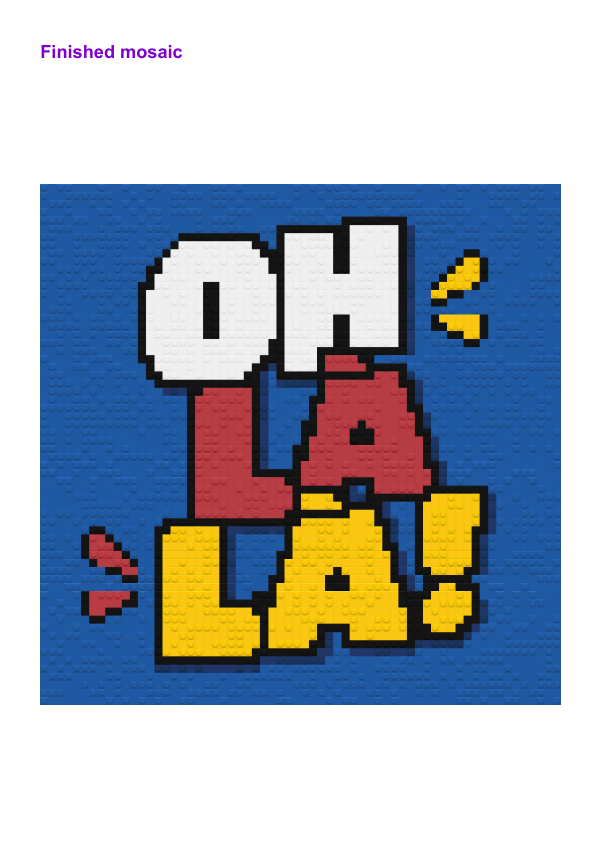
From bold lettering to 4,096 pieces: our “Oh la la!” mosaic

A closer look at the mosaic, its colors, and one baseplate from the build guide. We’re starting with one of our own projects: “Oh la la!” Bold lettering, a blue background, and a mosaic built from 4,096 pieces . The design uses a 64 × 64 stud format , arranged across four 32 × 32 baseplates . Here are three selected pages from its build guide : the finished mosaic reference, the color legend, and the grid for the first baseplate. 1. The mosaic preview This digital reference shows the planned result: cream colored lettering becomes white pieces, while blue, coral, yellow and black keep the design’s bold contrast. Build guide, page 7 — a digital reference for the planned mosaic. 2. The color legend Six numbered colors connect the picture to the pieces. The legend includes the quantities and the split between Basic pieces and Tiles. Build guide, page 2 — colors, piece types and quantities. 3. One baseplate, one manageable section The numbered grid shows placement for the first 32 × 32 baseplate. Its small position map indicates where that section belongs within the whole mosaic. Build guide, page 3 — the top left baseplate. Only

SSozaik_OfficialFeedback

Your first few minutes in Sozaik: where did you hesitate?

One specific moment can help us understand what needs to be clearer. We’d like to hear about your first experience with Sozaik — especially the moment when you weren’t sure what to do next. Maybe you were choosing an image, adjusting your mosaic, finding a control, or working out how to download the result. You can use this format: I was trying to… I expected… What happened was… I was using: phone or computer, plus browser if relevant. A screenshot can help, but please crop out personal or account information. You don’t need to suggest a solution. Describing the moment is useful on its own. Where did you pause or feel unsure?

SSozaik_OfficialVorstellungsrunde

Welcome to Sozaik Community — what would you love to turn into a mosaic?

Meet the team, share an idea, and help shape this space from the beginning. Hi everyone — we’re the team behind Sozaik. We’re opening this space for people who enjoy turning images into mosaics: first time makers, brick builders, artists, and anyone curious enough to try. You can share a work in progress, ask for advice, show something you’ve made, or tell us what could make Sozaik better. An idea is enough to join in. To introduce yourself, tell us: What would you like to turn into a mosaic? Would it be for your wall, a gift, or a physical build? When giving feedback, point to one detail that works and one thing the creator could try. Please credit other creators when sharing their work. What’s the first subject you have in mind?